Rethinking the Mobile Web by Yiibu
Mobile is dominant. Mobile does not = iPhone.
Rethinking the Mobile Web by Yiibu
Mobile is dominant. Mobile does not = iPhone.
Awwwards.com has compiled a list of some pretty fantastic WordPress plugins, including plugins for:
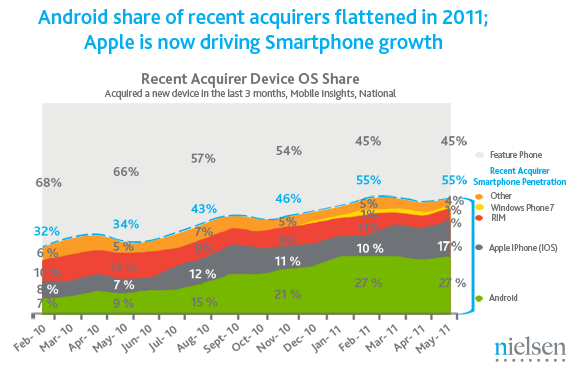

In a recent survey of mobile phone consumers, Nielsen reports that a majority of mobile phone purchases are now smartphones. Additionally, they included this nice graphic which charts a resurgence of Apple’s iPhone, which has been gaining market share in recent months in its ongoing competition with Google’s Android platform.
From the article:
Android continues to be the most popular smartphone operating system, with 38 percent of smartphone consumers owning Android devices. However, while Android also leads among those who recently purchased a new smartphone, it is the Apple iPhone that has shown the most growth in recent months.
via In US, Smartphones Now Majority of New Cellphone Purchases | Nielsen Wire
For those who love iA’s Writer app, Justin Blanton has examined details of its visual and typographic design:
Read more here: How to make any app look like iA’s Writer — Justin Blanton — Hypertext.net
For responsive web designers —
Chris Coyier lays out three currently experimental methods for serving specific images to a website user, depending on the user’s device: mobile, tablet, desktop.
The three he names include:
Chris provides helpful links to more extensive discussions of these methods. It seems that each offers benefits and drawbacks. It will be interesting to watch this develop.
From Elliott Jay Stocks:
The basic premise is this: you use media queries to design responsive websites that adapt their layout according to browser width, and you constantly resize your browser to see how the site performs, but each time a query kicks in, there’s a harsh jump between the old styles and the new ones. Why not use some simple CSS transitions to smooth that jump by animating the resize?
via CSS transitions & media queries » Blog » Elliot Jay Stocks.
This looks worth checking out:
“an awesome HTML5 and CSS3 framework for making responsive, cross-browser websites with beautiful typography”
Most responsive and adaptive HTML/CSS frameworks or boilerplates start with desktop styles and use media queries to serve mobile browsers the right layout. The problem is that most mobiles won’t respond to these media queries because they don’t support it. Also, using a polyfill like Respond.js will not give you any result because they are very limited devices and don’t even support JavaScript.
But Gridless uses a different approach: it uses media queries to serve a progressively-enhanced responsive layout, starting from mobile and building up to desktop sizes.
via Gridless – An awesome boilerplate for responsive, cross-browser websites.
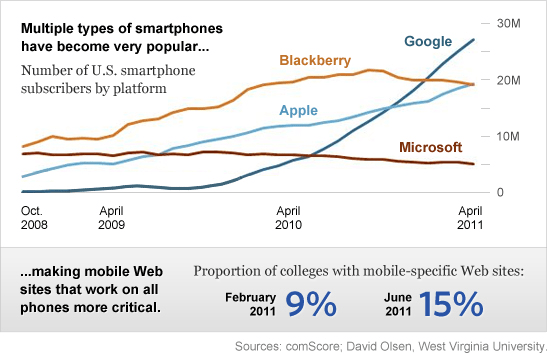

Consider the difficulty of developing mobile apps for all devices …
Many readers may have noted 37Signals’ decision to develop the mobile version of their popular Basecamp project management service as an HTML5 Web App. After having developed an iOS-native app for their Highrise application, they noted the fast rise of Android-based mobile devices. Rather than add an Android developer to their team, they opted to shift strategy. By developing the Basecamp app as a mobile web app, they made the app immediately accessible to a wide away of devices across multiple platforms. Continue reading “Colleges Weigh Costs of Native Mobile Apps versus Web Apps”
In a recent post, Ethan Marcotte clarifies his definition of “Responsive Web Design”:
A responsive design is composed of three distinct parts:
- A flexible grid.
- Flexible images. Or more specifically, images that work in a flexible context (whether fluid themselves, or perhaps controlled via overflow).
- Media queries. The final layer of a responsive design, media queries optimize the design for different viewing contexts, and spot-fix bugs that occur at different resolution ranges.
See Ethan’s post, On being “responsive” — Unstoppable Robot Ninja.
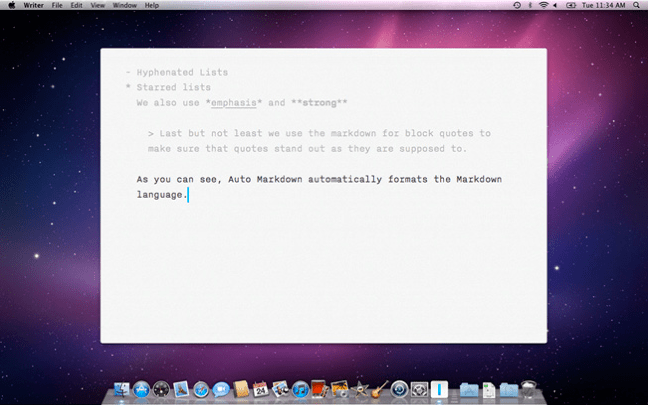

iA Writer let’s you focus on writing. Just writing.
It’s a beautiful thing.
 data enhanced